CASE STUDY — AI Workflow Strategy
Making time entry feel less like administrative work.
I turned recurring consultant friction with time reporting into an AI-assisted Microsoft Teams experience. Working with technology partners, I explored how planned bookings could be compared with signals from the work consultants actually completed to prepare a more accurate draft timecard across DPO and Workfront.
AI WORKFLOW STRATEGY
WORKFRONT
RAPID PROTOTYPING
SYSTEM THINKING
MICROSOFT TEAMS
DPO
ENTERPRISE UX
01
Orient
The experience model
02
Draft
03
Review
04
Submit
System of record
DPO / Dynamics 365

System of record
Workfront
One Microsoft Teams front door. Two distinct operational models.
Core insight
Planned time ≠ actual work
PM-entered bookings provided a starting point. The opportunity was to responsibly use work signals to help consultants reconcile what was planned with what actually happened.
Complexity rule
>10 bookings
Move users to Bulk Edit when the standard workflow is no longer the efficient choice.
AT A GLANCE
A portfolio story about turning user friction into an AI-assisted enterprise workflow.
The work began as a response to time-entry pain inside DPO, then evolved into a broader product strategy: use Microsoft Teams as a familiar employee surface, combine PM-entered plans with signals from completed work, let AI prepare a draft, and preserve consultant review before submission.
2
systems of record supported
1
Microsoft Teams experience
>10
bookings triggers the Bulk Edit path
4
delivery stages from POC to readiness review
Focus: research signal → product strategy → workflow → prototype → engineering → UAT
Role: Principal Experience Designer / UX Strategist
01 — Overview
This was not a chatbot project. It was a workflow redesign.
The opportunity was to reduce the administrative effort consultants spent preparing weekly timecards. I helped evolve the idea from an AI-assisted interaction into a Microsoft Teams product that could orient users, generate draft entries, support review and editing, and route complex weeks into the right tool.
Principal Experience Designer / UX Strategist
Role
Microsoft Teams + DPO + Workfront
PLATFORM
Consultants reporting weekly project time
AUDIENCE
CONTRIBUTION
Strategy, requirements, flows, prototyping, engineering handoff, UAT
A simple employee task was carrying the complexity of multiple enterprise systems.
How might we reduce repetitive time-entry work without creating a new workflow users have to learn?
Time reporting depended on bookings, project assignments, system-specific rules, submission deadlines, and different business models.
The user should not need to understand all of that architecture just to answer a weekly question: “Is my timecard ready?”
02 — CHALLENGE
01
Repeated setup
Consultants had to reconstruct project time each week even when much of the expected work was already represented in bookings and assignments.
02
System friction
Time reporting pain surfaced as part of the broader DPO experience issues users were already describing through research and survey feedback.
03
Different operating models
DPO and Workfront supported different business rules. A shared employee experience could not simply combine their data into one set of metrics.
04
Trust and privacy
Using Jira, GitHub, Slack, Teams, or Outlook as work signals could improve a draft, but the experience could not feel like employee monitoring or hidden surveillance.
03 — Why this became a priority
The survey did more than identify problems. It changed what we worked on next.
DPO research showed that platform improvement could not stop at navigation and reporting. Consultants were also spending effort inside transactional workflows such as time entry. That signal helped turn AI Time Assist from an interesting idea into a concrete product initiative.
Research signal → product opportunity
The same research program that supported broader DPO simplification also exposed where automation could remove recurring effort.
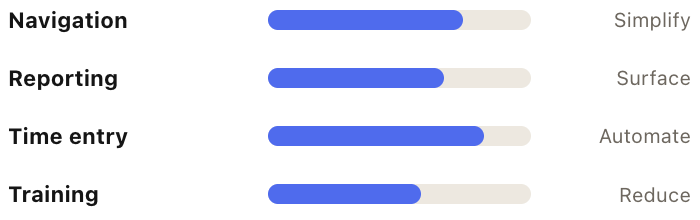
Illustrative portfolio visualization: bar lengths communicate relative opportunity areas, not published survey percentages.
How the roadmap responded
Different pain points required different design responses.
IA
Tidy Navigation
Reduce the system knowledge required to find work.
BI
Revenue Operations
Bring risk and action into one operational view.
AI
AI Time Assist
Remove repetitive setup from a high-frequency consultant workflow.
04 — Product strategy
The breakthrough was separating a shared experience from shared business logic.
When Workfront entered the scope, the easiest answer would have been to force both groups into the same dashboard logic. I took the opposite approach: create one consistent Teams interaction model while keeping system-specific metrics, deadlines, progress, and submission actions separate.
One front door. Two systems of record.
Consistency was applied at the interaction level, not by flattening operational differences that mattered to the business.
DPO / Dynamics 365
Customer Success
Time entry and project information tied to DPO workflows.
-
Separate DPO project totals
-
DPO-specific deadlines and actions
-
Booking-driven weekly timecard support
Workfront
Integrated Services
A parallel time-entry workflow with its own project model and calculations.
-
Separate Workfront totals
-
Workfront-specific status and actions
-
Same orientation and review patterns
MICROSOFT
TEAMS
EXPERIENCE
Consistency where it helps
Use the same page structure and interaction patterns across services.
Separation where it matters
Do not combine hours, deadlines, progress, analytics, or submission actions.
Plans + actual signals
Start with PM-entered bookings, then use work artifacts to suggest where actual effort may have differed.
Escalate complexity
Move high-booking scenarios into Bulk Edit instead of overloading the standard flow.
05 — Applying the strategy
The product had to answer “what needs my attention?” before asking users to enter time.
The homepage evolved into a lightweight dashboard. It orients the consultant first, then provides clear paths into DPO or Workfront timecards. Use the controls below to move through the three key experience moments.


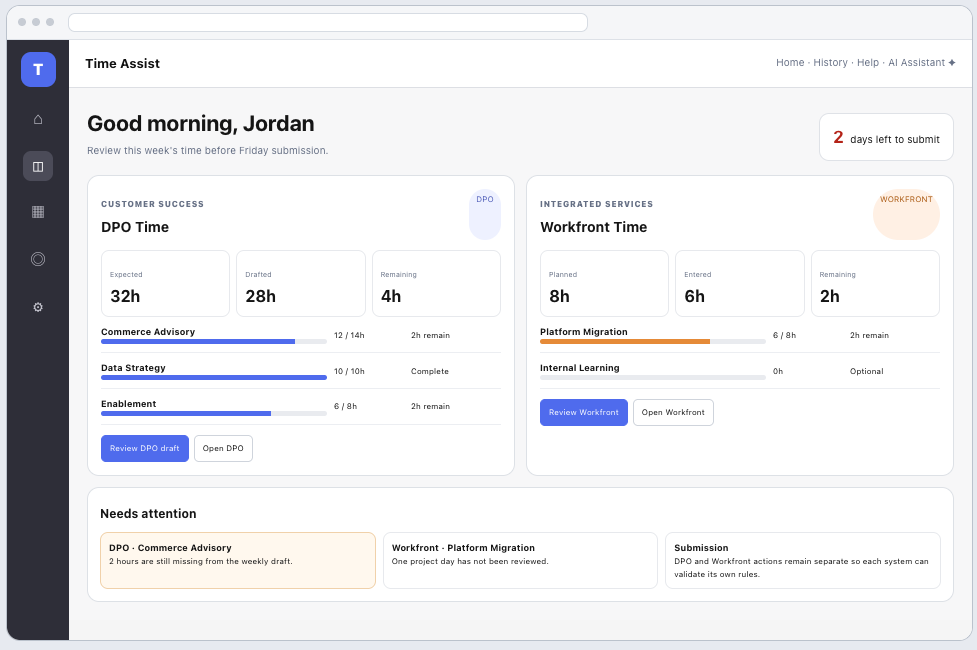
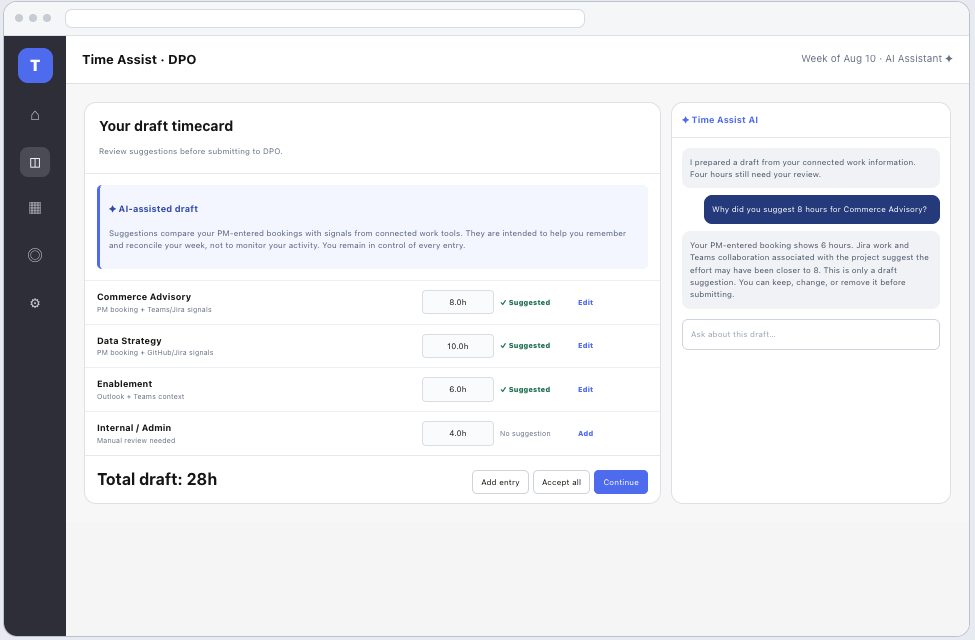
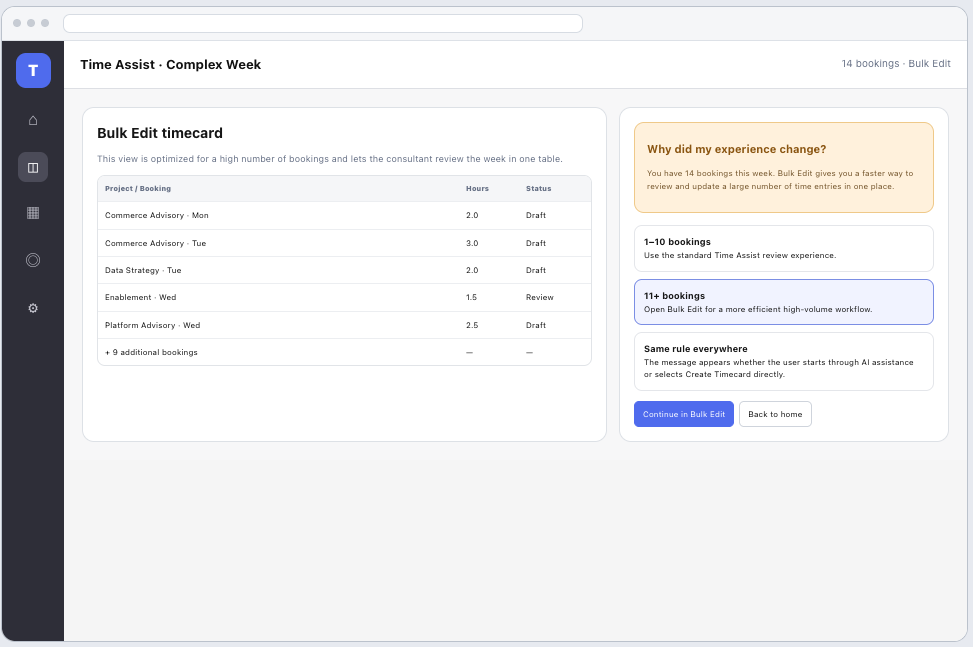
Portfolio note: interface visuals use recreated and sanitized example data to communicate the design approach without exposing proprietary case information.
06 — Designing AI + user control
Could technology help reconstruct the week without making people feel watched?
I worked with technology partners to explore how AI could compare PM-entered bookings with existing work artifacts from tools such as Jira, GitHub, Slack, Teams, and Outlook. The goal was not to create a surveillance system. It was to use signals consultants were already generating through their work to prepare a draft they could quickly confirm, correct, or reject.
The AI-assisted workflow
The value was not “AI fills out a form.” The value was reducing the blank-page problem while preserving accountability.
1
Start with the plan
Use the PM-entered booking as the expected allocation, not as unquestioned truth.
2
Compare work signals
Look for project-related artifacts across Jira, GitHub, Slack, Teams, and Outlook that may indicate where actual effort differed.
3
Explain
Show why a suggestion was created when the user needs context.
4
User decides
Accept, edit, add, replace, or reject before submission.
Human control was designed into the interaction.
The system reduces effort without obscuring where the draft came from or removing the consultant's ability to correct it.
Review before submit
No draft becomes a final timecard without user review.
Edit every suggestion
Suggested hours remain flexible because real work can differ from planned bookings.
Explain the suggestion
Users can ask where a proposed entry came from instead of treating AI as a black box.
Add what AI cannot know
Manual entries remain part of the workflow for work connected signals cannot reliably infer.
From planned hours to a suggested view of actual work
The technical exploration focused on reconciliation, not passive tracking. PM-entered bookings established what was expected. Existing project artifacts could provide lightweight evidence of where the consultant actually spent effort. AI could then surface a suggestion for the consultant to validate.
Planned
What the PM entered
Bookings and project allocations represented the expected week.
-
Project assignment
-
Expected hours
-
Scheduled project days
What the work artifacts may indicate
Suggested actuals
Project-related activity could help remind the consultant where effort actually occurred without claiming to measure every minute worked.
-
Issue and ticket activity
-
Code contribution signals
-
Project meetings and collaboration
-
Consultant confirmation before use

COMPARE
Tickets, assignments, work-item context
Jira
GitHub
Project-related commits and pull-request context
Project collaboration signals, not message surveillance
Slack
Teams
Meetings and project collaboration context
Outlook
Calendar context for project-related meetings
Useful enough to help. Respectful enough to trust.
Use metadata, not message content
Prefer the existence and project association of work artifacts over reading private conversation content.
Explain the suggestion
Let users see which categories of signals influenced a proposed time entry.
The experience needed clear boundaries so “smart time entry” did not become “employee tracking.” That meant minimizing data, showing users how suggestions were formed, and keeping the final decision with the consultant.
Consultant confirms
No inferred “actual” becomes reported time without explicit human review.
07 — Designing for complexity
A good workflow knows when it should get out of the way.
The standard review experience works well for a manageable number of bookings. Past a certain point, forcing the same interaction creates more effort. We designed an explicit threshold that redirects high-volume weeks into Bulk Edit.
10
The standard workflow stops here.
More than ten bookings triggers a transition to Bulk Edit because a table-based experience is more efficient for reviewing many entries at once.
The rule had to feel intentional, not like an error.
Evaluate what could be delivered as an MVP, what required integraThe design communicates why the user is being redirected and applies the same behavior regardless of how they entered the workflow.tion work, and which signals were essential enough to justify complexity.
1–10 bookings
Use Time Assist to review suggested entries in a guided workflow.
11+ bookings
Use Bulk Edit to manage the week efficiently in a high-density table.
Example system message
You have more than 10 bookings this week. To make reviewing your timecard faster, we'll open Bulk Edit so you can update all of your entries in one place.
The concept moved from workflow idea to implementation-ready product direction.
08 — Delivery & outcome
I partnered with business and engineering stakeholders as the product evolved from the first DPO proof of concept into requirements, UAT, deployment-readiness review, and a parallel Workfront concept.
Business rules
Defined how deadlines, project information, booking thresholds, and service-specific differences should shape the experience.
Experience strategy
Dashboard orientation, AI drafting, review/edit patterns, transparent redirection, and a consistent Teams interaction model.
Technology feasibility
Explored how Jira, GitHub, Slack, Teams, Outlook, DPO, and Workfront signals could be connected responsibly, what data was actually useful, and where privacy boundaries had to shape the solution.
01
Presented the end-to-end Microsoft Teams Time Assist experience to engineering.
POC
02
Completed Phase 1 requirements and moved into developer grooming.
Requirements
03
Prepared the experience for UAT and refined detailed interaction behavior.
Validation
04
Scale
Advanced DPO toward deployment readiness while extending the concept to Workfront.
The project created a scalable model for simplifying time entry without forcing different service organizations into the same operational logic.
The work expanded Time Assist from an AI interaction into a broader Microsoft Teams product strategy. It established how consultants could orient themselves, reconcile PM-entered plans with suggested actuals derived from existing work signals, review AI-assisted drafts, handle complex weeks, and move between DPO and Workfront workflows through one familiar employee surface.
Teams-first experience
Moved the workflow closer to where consultants already work.
Reduced blank-page effort
Used connected signals to prepare reviewable draft entries.
Scalable interaction model
Supported DPO and Workfront without collapsing distinct business rules.
Implementation direction
Created flows and requirements engineering could evaluate, build, and validate.
What this case demonstrates
AI Product Strategy
Turned AI from a feature idea into a broader workflow and product model.
Designed one employee experience across two systems of record and distinct operating models.
Systems Thinking
Enterprise Workflow Design
Connected orientation, draft generation, review, editing, submission, and exception handling.
Balanced automation with privacy by using work signals as suggestions rather than treating them as surveillance or unquestioned truth.
Human-Centered AI
Interaction Design
Designed dashboard, timecard, assistant, and high-volume Bulk Edit patterns.
Recognized when a different interaction model was more efficient than forcing one universal flow.
Edge-Case Design
Technical Collaboration
Partnered with technology teams to explore cross-platform signals, feasibility, privacy boundaries, requirements, UAT, and readiness.
Connected research findings to a new product initiative focused on reducing consultant effort.
Strategic Prioritization
I design AI workflows that use technology to reduce administrative work without turning assistance into surveillance.
That principle helped turn weekly time entry from a system-centered task into a more assistive employee experience that could scale across enterprise platforms