CASE STUDY — AI Experience Strategy
Designing AI that earns its place in the workflow.
I reimagined a Microsoft Dynamics 365 support experience so engineers could prioritize complex cases, understand what changed, and act on AI recommendations with the context and evidence needed to trust them.
AI EXPERIENCE STRATEGY
RESEARCH
DESIGN SYSTEMS
INTERACTION DESIGN
ENTERPRISE UX
RAPID PROTOTYPING
DYNAMICS 365
The experience model
01
Prioritize
02
Understand
03
Act
04
Verify

The strategic shift was simple: stop asking engineers to hunt through AI output and start placing intelligence at the moment a decision is required.
Raw case signals
Decision-ready intelligence
Connected surfaces
2
Priority work queue + AI-assisted case experience.
Core principle
Evidence on demand
Enough context to act quickly, with source detail available when trust needs verification.
AT A GLANCE
A portfolio story about turning AI output into decision support.
2
connected enterprise surfaces
Focus: discovery → prioritization → interaction model → prototype → feasibility
4
decision moments in the experience model
Role: Principal Experience Designer / UX Strategist
The project started with a broad question about AI adoption and evolved into a more focused experience strategy: prioritize the right case, surface meaningful change, recommend the next action, and keep evidence close enough to build trust.
1
shared priority queue vision
MVP
use cases prioritized with business + engineering
01 — Overview
This was not about adding more AI to Dynamics 365.
The opportunity was to make AI useful inside an engineer's existing support workflow. I focused on the connected decisions engineers make across the dashboard and the case page, then designed an experience where AI could help without becoming another destination to manage.
Principal Experience Designer / UX Strategist
Role
Microsoft Dynamics 365 + AI support services
PLATFORM
Customer Engineering & support teams
AUDIENCE
CONTRIBUTION
Discovery, strategy, interaction design, prototypes, feasibility
Engineers had access to intelligence. The harder problem was knowing what deserved attention.
How might we reduce the effort required to understand a case without asking engineers to surrender judgment to AI?
Case work contained customer messages, engineer notes, escalations, SLA information, diagnostics, sentiment, AI-generated summaries, and recommended actions.
Adding more panels did not automatically make the work easier. The experience needed a stronger hierarchy around priority, change, action, and trust.
02 — CHALLENGE
01
Competing information
AI, case activity, draft notes, diagnostics, and product information were all competing for limited space and attention.
02
Hidden change
Users needed to know what changed since their last visit without repeatedly reading the full timeline.
03
Different priority logic
SLA, client tier, customer response, blockers, and case status could all influence what should be worked on next.
04
Trust gap
AI recommendations were more useful when users could understand the basis and inspect evidence when needed.
03 — Research & synthesis
I looked for the decisions behind the requested features.
Workshops, end-user feedback, stakeholder reviews, and prototype discussions showed that the biggest opportunity was not another collection of AI cards. Engineers needed clearer support for the moments when they decide what to work on, what changed, and what action to take next.
What the workflow kept asking engineers to do
Find the case that matters most
1
Use priority signals instead of relying on one universal ranking rule.
These repeated needs became the foundation for the experience model.
2
Understand what changed
Surface recent customer, engineer, internal, and escalation activity.
3
Know the blocker or next action
Make missing information and actionable warnings visible immediately.
4
Verify when confidence is low
Keep source evidence available without forcing a detour for every decision.
The design tension
The case view had to balance leadership vision, end-user behavior, and the constraints of an existing Dynamics experience.
User need
Less hunting through tabs and activities
Recent updates and blockers needed to appear where the action happens.
Business need
Make AI value visible
The experience needed to demonstrate why the intelligence was useful, not simply that it existed.
Platform reality
Work within Dynamics 365
Existing tabs, case structure, and side-panel competition were real design constraints.
04 — AI strategy
The breakthrough was moving from AI content to AI-supported decisions.
Rather than treating the dashboard and case page as separate design problems, I defined a connected experience model. The dashboard helps engineers decide where to focus. The case view helps them decide what to do.
From ”show me AI” → ”help me make the next decision”
The strategy reduced the number of concepts competing for attention by organizing intelligence around a clear sequence.
Prioritize
01
Use SLA, client tier, customer activity, blockers, and other signals to shape the work queue.
Understand
02
Show why the case surfaced and summarize only what the engineer needs to reorient quickly.
Act
03
Make the strongest actionable signal the recommended next action instead of another informational card.
Verify
04
Expose sources, freshness, and supporting detail when the engineer needs to confirm the recommendation.
What deserves my attention?
Queue
What happened since I last looked?
Recent Changes
What should I do now?
Next action
Why should I trust this recommendation?
Evidence
05 — Applying the strategy
One workflow. Two connected surfaces.
The prototype connected a priority work queue with an AI-assisted case experience. The screens below use recreated, sanitized example data to demonstrate the interaction model without exposing proprietary information.


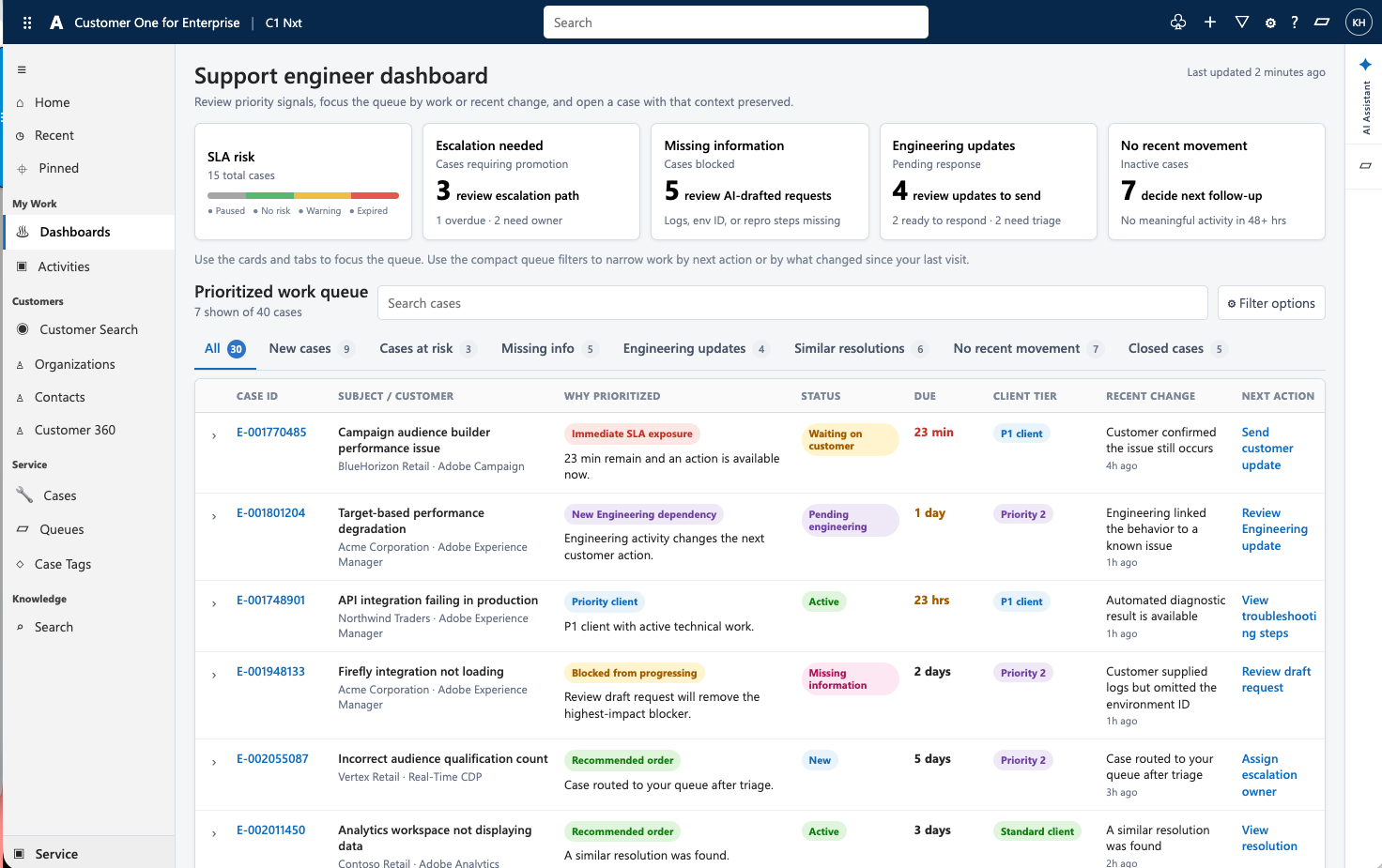
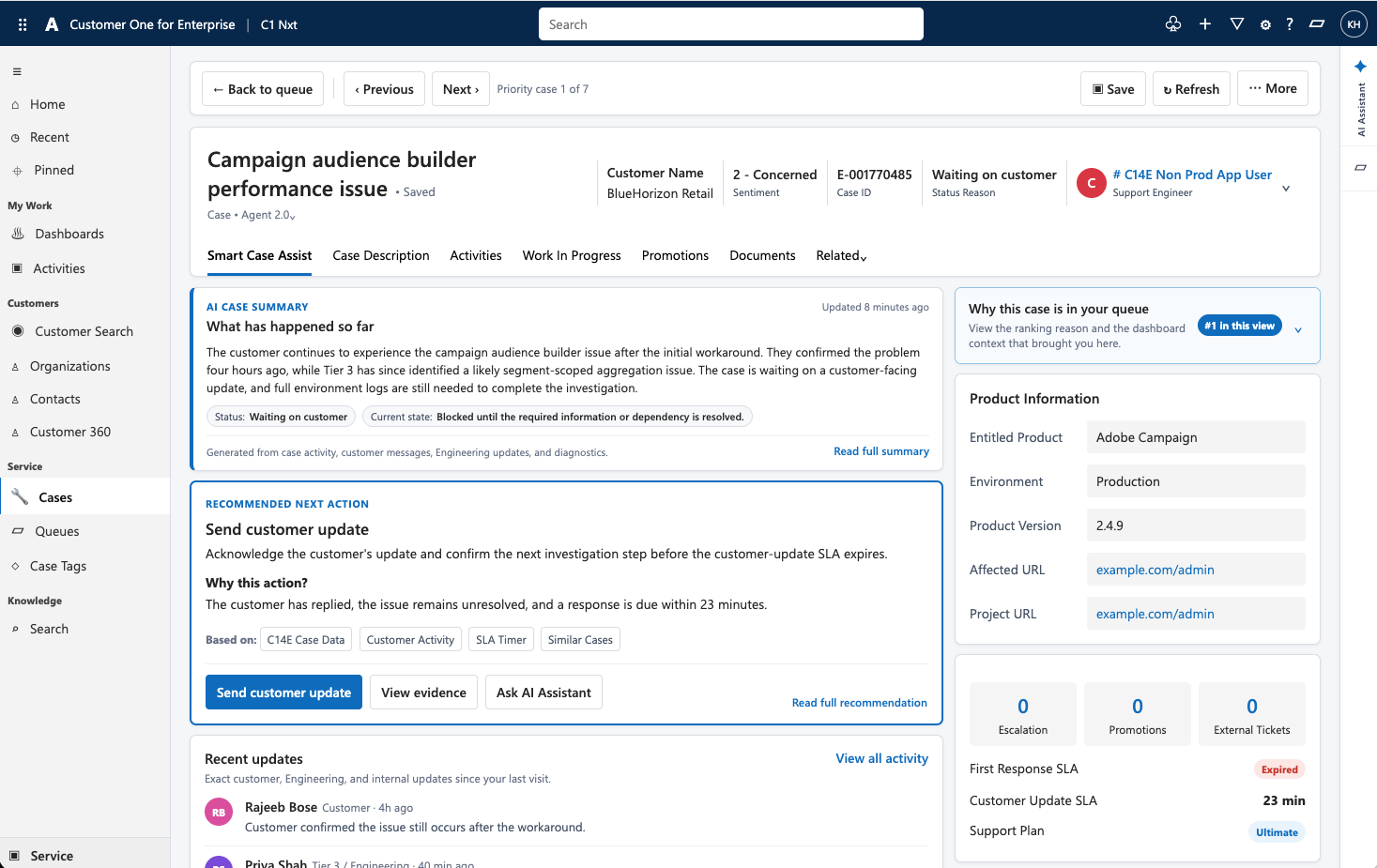
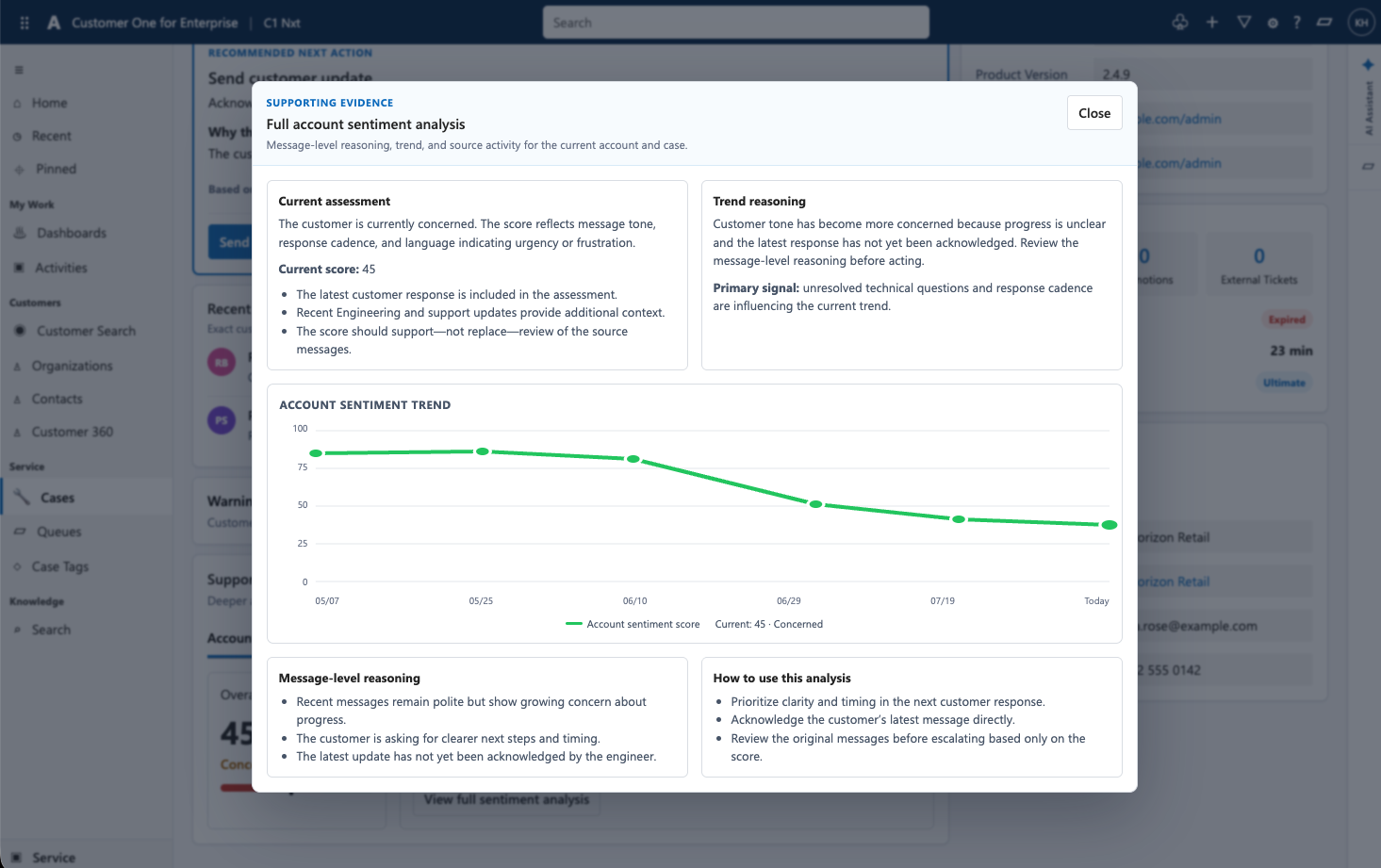
Portfolio note: interface visuals use recreated and sanitized example data to communicate the design approach without exposing proprietary case information.
DECISION #1
Recent updates stay visible
“What changed?” was elevated into the case experience instead of forcing users to re-read the entire activity timeline.
One strongest next action
DECISION #2
The most severe actionable signal becomes the recommendation. Non-actionable information remains supporting intelligence.
DECISION #3
Support, do not replace, judgment
AI gives the engineer a recommendation and enough context to act, while evidence and the assistant remain available for deeper review.
06 — Designing for trusT
Trust needed an interaction model, not a disclaimer.
The goal was to reduce the need to inspect every piece of evidence while never removing the user's ability to verify where a recommendation came from.
A recommendation should explain itself.
I structured AI guidance around four layers that could support both speed and scrutiny.
1
Recommendation
What should I do next?
2
Reason
Why does this action matter now?
3
Basis
Which signals shaped the recommendation?
4
Evidence
Show me the underlying detail when I need it.
Evidence on demand
Keeping evidence close to the decision reduces context switching while allowing users to validate AI output when confidence is low.

Why this recommendation?
The customer replied without an engineer acknowledgment, the response SLA is breached, and the diagnostic remains incomplete because required environment information has not been provided.
07 — Engineering collaboration
Technical constraints were part of the strategy.
The work had to fit a live Microsoft Dynamics 365 environment with existing tabs, case structures, side-panel behavior, and multiple AI initiatives already competing for engineering capacity.
Dynamics 365
Preserve familiar case structures and platform interaction patterns instead of inventing a visually disconnected experience.
Design decision: rather than treating feasibility as a handoff gate, the team used engineering spikes and prototype reviews to shape MVP prioritization while the experience was still being defined.
Experience strategy
Prioritization, recent changes, progressive disclosure, next-action logic, trust cues, and workflow continuity.
Engineering feasibility
Evaluate what could be delivered as an MVP, what required integration work, and which signals were essential enough to justify complexity.
08 — Outcome
The work established a shared direction for a simpler, more actionable DPO.
The project moved the conversation from adding more AI features toward a clearer model for how intelligence should support prioritization and case decisions inside Dynamics 365. The dashboard direction generated strong stakeholder interest, while the case experience became the focus of continued MVP definition, end-user validation, and technical feasibility work.
Priority queue vision
Connected case signals to clearer work prioritization.
Case experience model
Linked summary, recent change, next action, and evidence into one decision flow.
MVP direction
Helped separate essential signals from a broader set of possible AI features.
Cross-functional alignment
Created a concrete prototype for business, UX, and engineering to evaluate together.
What this case demonstrates
AI Experience Strategy
Designed around decisions and workflow, not AI novelty.
Balanced multiple signals, roles, platform constraints, and competing initiatives.
Enterprise Complexity
Human-Centered AI
Kept judgment with the engineer while making recommendations faster to understand.
Connected queue prioritization, recent updates, recommendations, evidence, and AI assistance.
Interaction Design
Design Systems Thinking
Introduced AI capability without abandoning established Dynamics patterns.
Used engineering feasibility to shape MVP decisions before handoff.
Technical Collaboration
Executive Communication
Translated a complicated AI feature set into a concise experience model stakeholders could evaluate.
Refined the direction as user needs, business priorities, and technical realities became clearer.
Strategic Flexibility
I design AI experiences by deciding where intelligence belongs, what it should explain, and when humans need control.
That principle turned a collection of AI capabilities into a more coherent support workflow designed around the engineer's next decision.